
Your Business Is Invisible Online — Here's How to Fix It for Free
If a customer searches for your business on Google and nothing shows up, you may as well not exist. Claiming your Google Business Profile is the single easiest thing you can do to get found — and it costs nothing.

What exactly is a Google Business Profile?
You've seen them before, even if you didn't know what they were called. When you search "pizza near me" or "hair salon in [your town]," a list of local businesses pops up on the right side of the screen or at the top of the results. That box showing the business name, address, hours, photos, and reviews? That's a Google Business Profile (it used to be called Google My Business).
Every local business deserves one — whether you run a bakery, a plumbing company, a dog grooming service, or a law office. Think of it as your free storefront on the internet's busiest street.
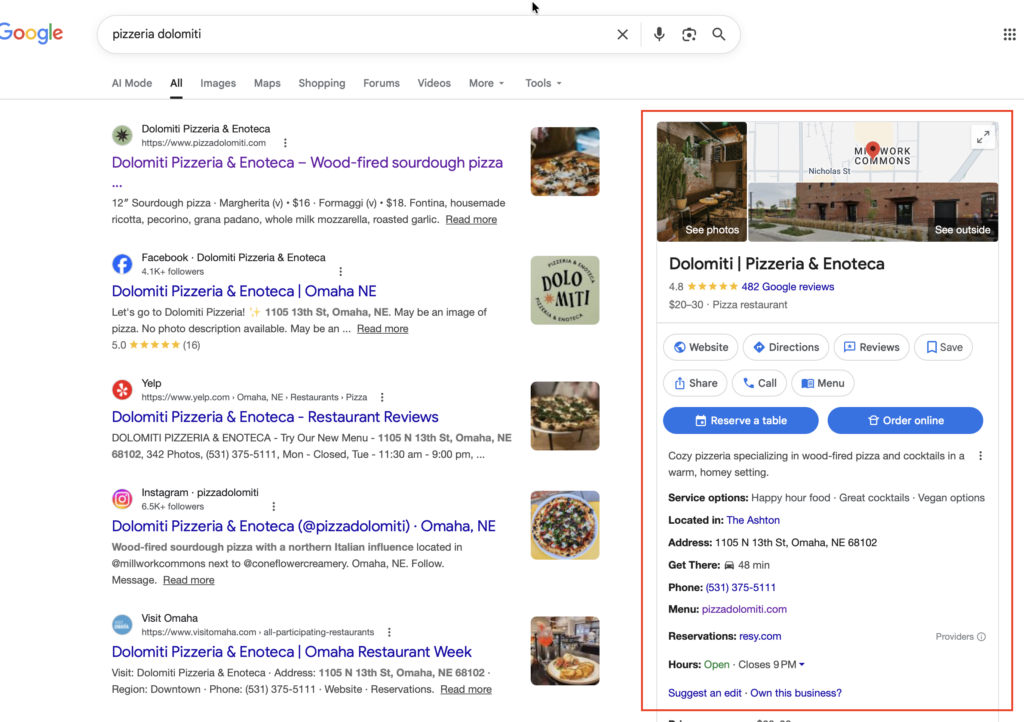
Why does it matter so much?
Here's the honest truth: most people never scroll past the first page of Google results. If your business isn't showing up there, customers are finding your competitors instead. A claimed and complete Google Business Profile dramatically improves your chances of appearing when nearby customers search for what you offer.
Beyond just being found, your profile also lets customers:
- Call you directly from Google with one tap on their phone
- Get turn-by-turn directions to your location
- Read reviews from other customers
- See your hours, so they know you're open before they drive over
- Browse your photos and menu or service list
GOOD TO KNOW
Google may have already created a basic listing for your business automatically. That means someone else could be editing or "suggesting" changes to it right now. Claiming it puts you back in control.
How to claim your Google Business Profile — step by step
Don't let the technology intimidate you. Here's exactly what to do, written in plain English:
- Go to Google's Business Profile websiteOpen your web browser and go to business.google.com. You'll need a Google account to proceed — if you use Gmail, you already have one. If not, you can create a free Google account in about two minutes.
- Search for your businessType your business name into the search bar. Google will show you whether a listing already exists. If it does, select it. If nothing comes up, you'll see an option to create a new profile — go ahead and do that.
- Fill in your business detailsAdd your business name, address, phone number, website (if you have one), and business category. Choose the category that best describes what you do — this helps Google show your listing to the right people.
- Verify that you own the businessGoogle needs to confirm you actually own the business. The most common method is receiving a postcard at your business address with a verification code — it usually arrives within 5 days. Some businesses can verify instantly by phone or email instead.
- Enter your code and go liveOnce your postcard arrives, log back into business.google.com, find your listing, and enter the 5-digit code. That's it — your profile is verified and live on Google!
Once you're verified, here's how to make your profile shine
A claimed profile is good. A complete profile is great. Here's what to do right after you're verified:
- Add photos.Businesses with photos get significantly more clicks. Add shots of your storefront, your team, your products, or your work. Your phone camera is more than good enough.
- Set your hours accurately. Include holiday hours — nothing frustrates a customer more than driving to a closed shop.
- Write a short business description.Two or three sentences about what makes you special. Keep it simple and honest.
- Ask happy customers for reviews.More positive reviews = more trust = more new customers. Just ask them directly, "Would you mind leaving us a Google review?"
- Respond to reviews.Thank people for kind words, and handle any negative reviews calmly and professionally. Potential customers are watching how you respond.
PRO TIP
Keep your information consistent everywhere online — your Google profile, your website, Facebook page, and anywhere else you're listed. The same name, address, and phone number across all platforms helps Google trust your business and rank it higher.
Common questions from business owners
What if I run my business from home and don't want to share my address?
No problem. Google lets you hide your address and instead show only the service areas you cover. This is perfect for plumbers, cleaners, photographers, and other service-based businesses.
What if someone else already claimed my business?
This does happen. If someone — perhaps a former employee or even a competitor — has claimed your listing, Google has a process to request ownership. Visit business.google.com and select "Request access" on your business listing. Google will handle the dispute.
Do I need a website first?
No. Your Google Business Profile works completely on its own. You can add a website link later if you have one, but it's not required to get started.
Ready to get found on Google?
It takes five minutes and costs nothing. Your next customer is already searching.
Request a free quote
We offer affordable professional services that help you build effective strategies to reach customers and prospects across the web.
Recent Posts
- Your Competitors Are Invisible Online. Don't Be One of Them. April 7, 2026
- Claim Your Google Business Listing April 3, 2026